At Computrols, we believe the majority of our competitors in the building automation industry overcomplicate their offerings, whether through their hardware, software, or how they program buildings. Our focus has always been on creating the most intuitive user experience possible, because a building automation system is only as powerful as the people who operate it every day.
In a previous article, we compared Computrols CBAS programming to Siemens PPCL, a line-numbered programming language that requires specialized training to read and write. This time, we’re looking at a different approach used by another respected competitor: graphical block programming, as found in Automated Logic’s EIKON software for WebCTRL.
On the surface, block programming looks approachable. In a sales demo, dragging a few function blocks onto a canvas and wiring them together feels intuitive, even fun. But real buildings aren’t sales demos. Below are actual screenshots from a production WebCTRL hot water system serving a commercial facility. What starts as a few tidy blocks becomes a sprawling wiring diagram, and the only person who can confidently read it is the programmer who drew it, often an outside integrator who may no longer support the site.
Let’s walk through five everyday control functions from this system and compare how they’re accomplished in EIKON versus CBAS.
Example 1: Pump Failure and Hand Alarms
Every plant needs to know when a pump is commanded on but isn’t running, or when someone has placed it in hand at the starter. It’s among the most common alarming requirements in any building.
Automated Logic EIKON
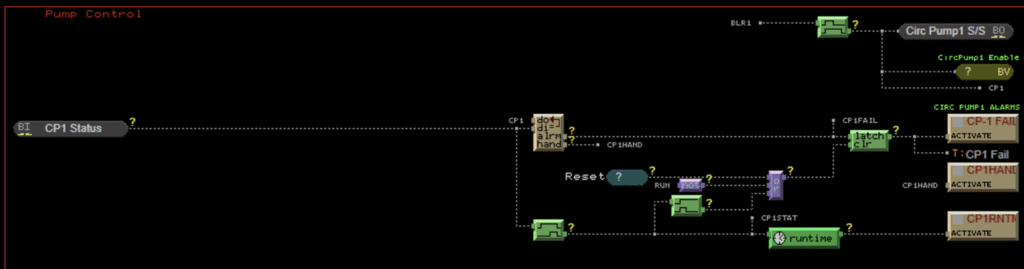
In this system, detecting a fail or hand condition on a single pump requires a chain of function blocks: a digital output/input comparison block to detect the mismatch, NOT gates, time-delay blocks to prevent nuisance alarms, and a latch block with a separate reset wire so the alarm holds until acknowledged. That network of blocks and wires is then duplicated, in its entirety, for every pump and boiler in the plant. In these screenshots alone, the same alarm circuitry appears four separate times: once each for Circulating Pumps 1 and 2, and again for Hot Water Pumps 1 and 2.
Computrols CBAS
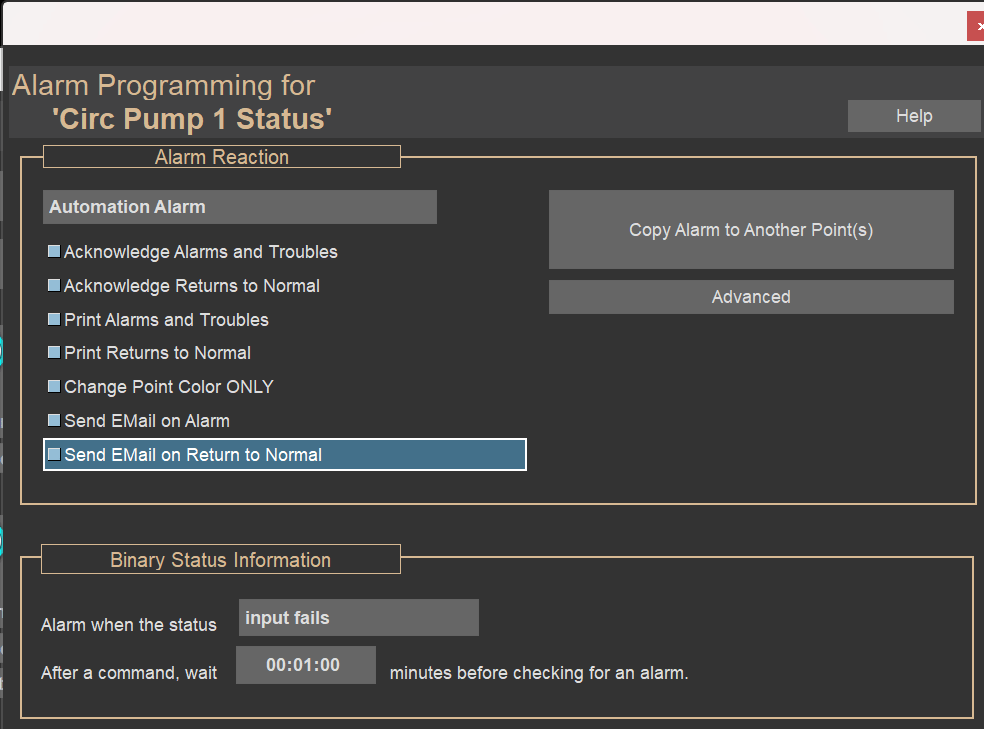
In CBAS, commanded-versus-status failure alarming isn’t something you write a program for. It’s a built-in feature of the point itself. When a binary output has an associated status input, you simply enable the failure alarm on the point and set your delay time. The alarm, delay, latching behavior, and operator acknowledgment are all handled automatically by the system.
If a site prefers to see it spelled out in logic, the equivalent CBAS statement is a single line of plain English:
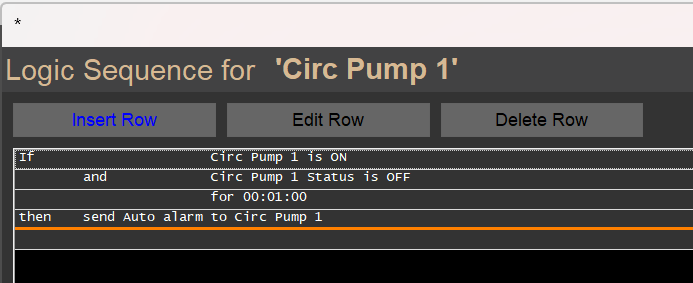
The takeaway: Four copies of an eight-block alarm circuit versus a checkbox on a point. Anyone on your team can understand the CBAS version at a glance.
Example 2: Equipment Runtime Tracking
Runtime totalization drives preventive maintenance, warranty tracking, and lead/lag rotation. You need it on virtually every piece of rotating equipment.
Automated Logic EIKON
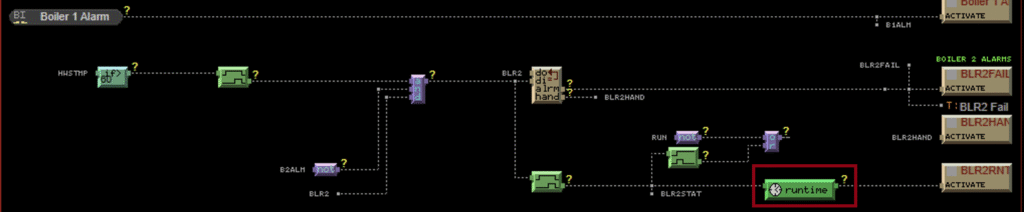
In EIKON, runtime is one more thing to program. The boiler in this screenshot has its own runtime accumulator block wired to its status point, and each accumulator is another object to configure, maintain, and wire into anything that needs the value.
Computrols CBAS
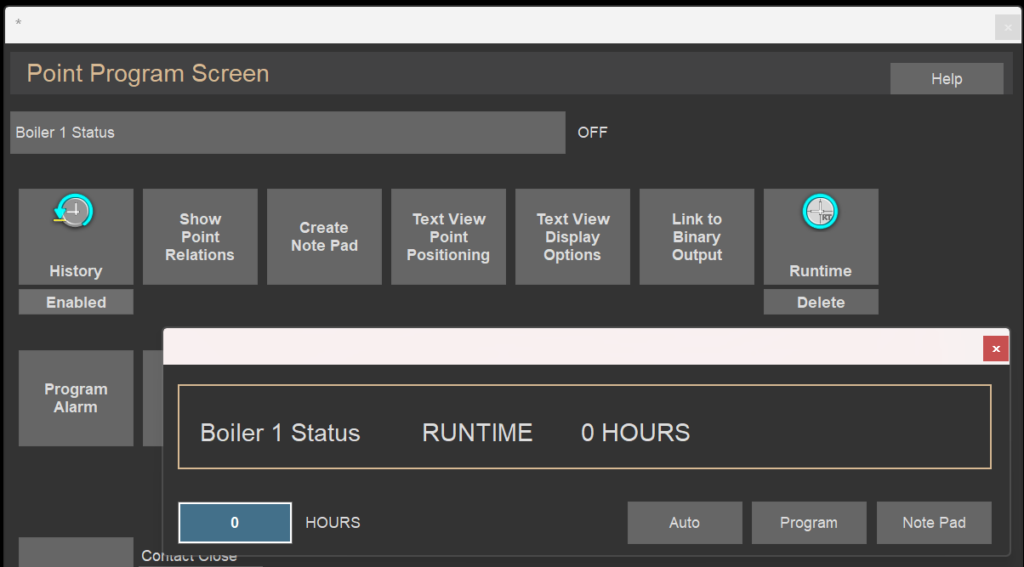
There is nothing to program. CBAS automatically totalizes runtime on binary points in the system with a single click – no logic, no blocks, and no wiring. Runtime is simply there when you need it: on the point, in reports, and available to any logic that wants to reference it.
The takeaway: The best program is the one you never have to write.
Example 3: Hot Water Reset Schedule
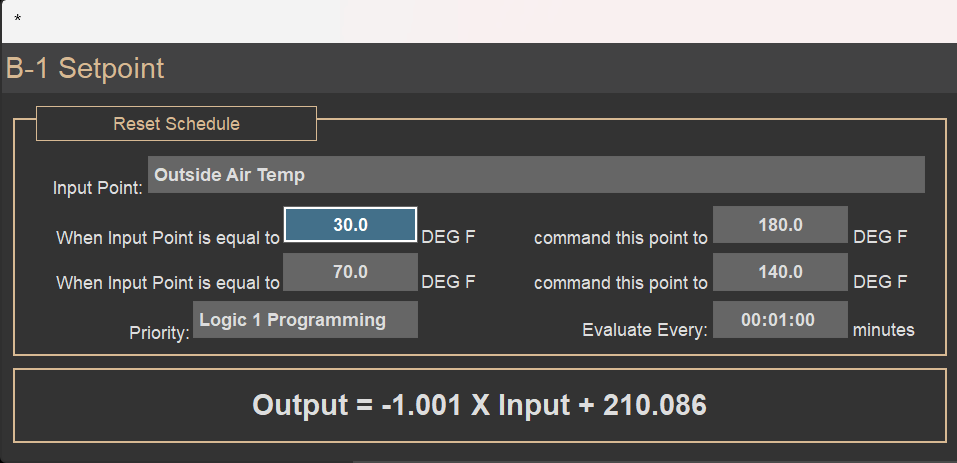
Readers of our Siemens PPCL comparison will remember this one. Resetting the hot water setpoint based on outside air temperature is a bread-and-butter energy-saving strategy, and it’s a fair test of any programming environment.
Automated Logic EIKON
In this system, each boiler’s setpoint is produced by a reset/scale block fed by the outside air temperature, routed through a switch block, and wired to the setpoint output, with the entire arrangement duplicated for Boiler 1 and Boiler 2. To find out what the reset schedule actually is (the temperatures at each end of the scale), an operator has to open the block’s properties. The intent is buried inside the block.

Computrols CBAS
In CBAS, the reset schedule is a built-in function that reads like a sentence, right on the screen:
The takeaway: Again, the best program is the one you never have to write.
Example 4: Boiler and Pump Lead/Lag Rotation
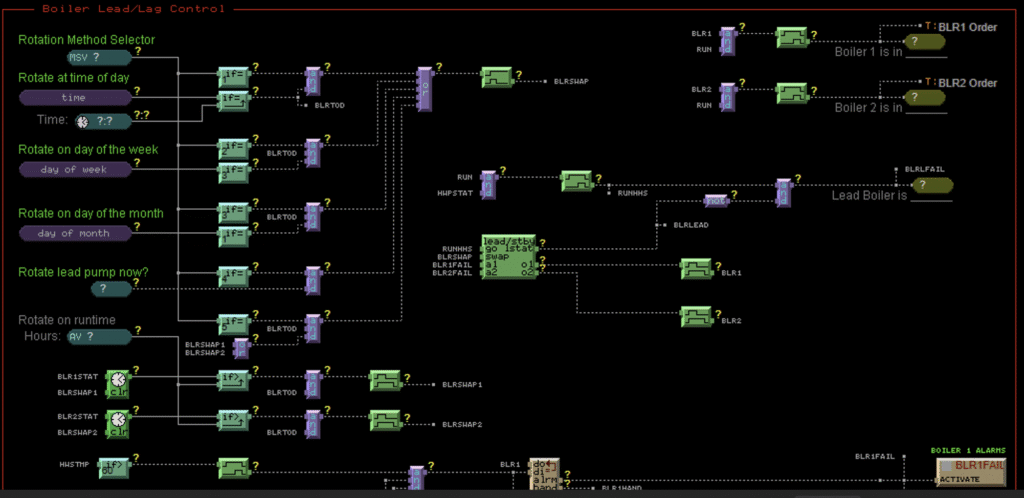
Here’s where block programming truly shows its cost. This facility rotates its lead boiler and lead pump on a selectable schedule: daily, weekly, monthly, on accumulated runtime, or manually on demand.
Automated Logic EIKON
The lead/lag logic in this system is a full screen of blocks: a rotation method selector feeding roughly fifteen comparison blocks, latches, one-shots, and timers, all converging on a lead/standby swap block, with additional logic to clear and re-arm the rotation triggers. And because the boilers and the pumps each need rotation, the entire diagram exists twice. The programmer even left on-screen notes to future readers explaining behaviors that aren’t evident from the blocks themselves, a candid admission that the diagram can’t speak for itself.
Computrols CBAS
CBAS expresses the same strategy in a handful of readable lines. A rotation on accumulated runtime, for example:
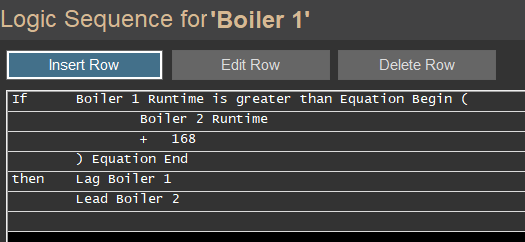
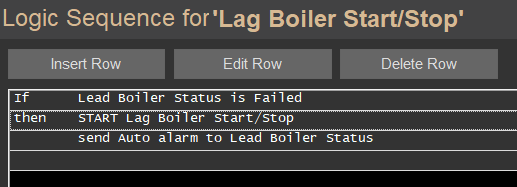
CBAS also includes a Sequencer module to make this process even simpler:
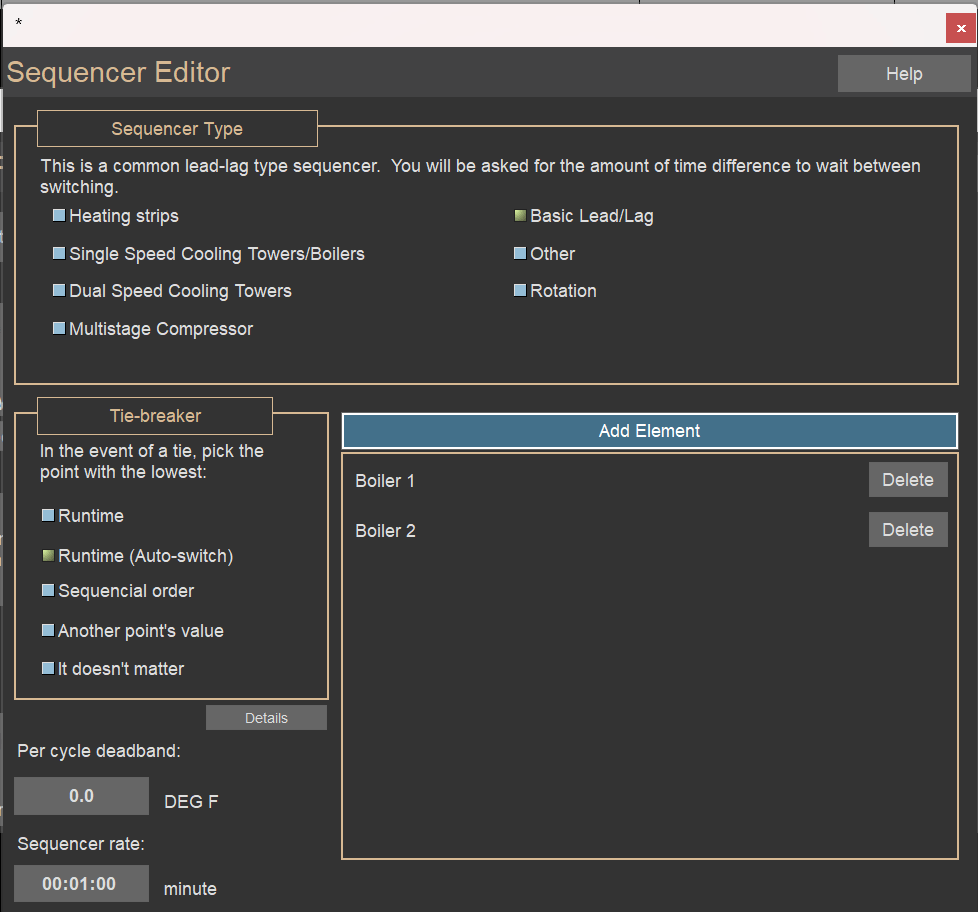
The takeaway: One environment needs two full screens of wiring and notes from the programmer. The other reads like the sequence of operations it came from.
Example 5: High/Low Temperature History
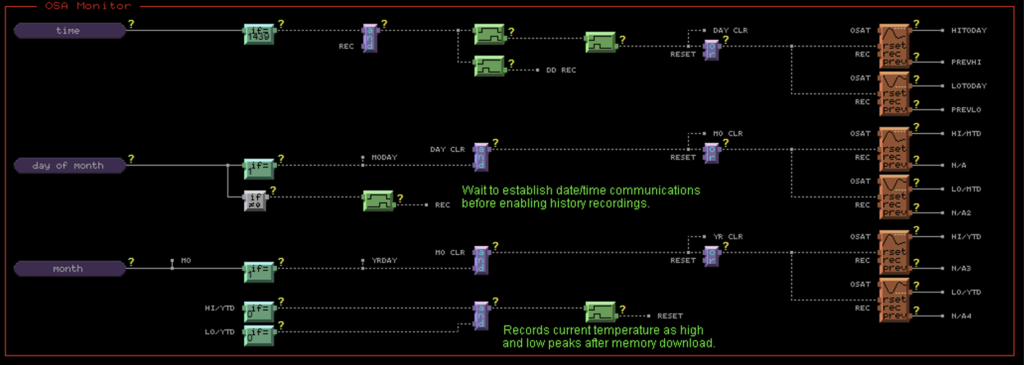
This system dedicates an entire program section, the “OSA Monitor,” to recording outside air temperature highs and lows for the day, month, and year.
Automated Logic EIKON
Accomplishing this in EIKON requires time, day-of-month, and month comparator blocks to trigger record and reset pulses into a bank of roughly 2 dozen min/max peak-hold blocks. The programmer’s own on-screen notes warn that history recording must wait until date/time communications are established, and that peaks must be re-recorded after a memory download. In other words, history is fragile, and keeping it intact depends on tribal knowledge written in the margins.
Computrols CBAS
CBAS automatically trends every point in the system, continuously, with no programming. Daily, monthly, and yearly highs and lows for outside air temperature aren’t something you build out of comparators and latches; they’re a report you pull from history that’s already there. No blocks, no reset pulses, no warnings about memory downloads.
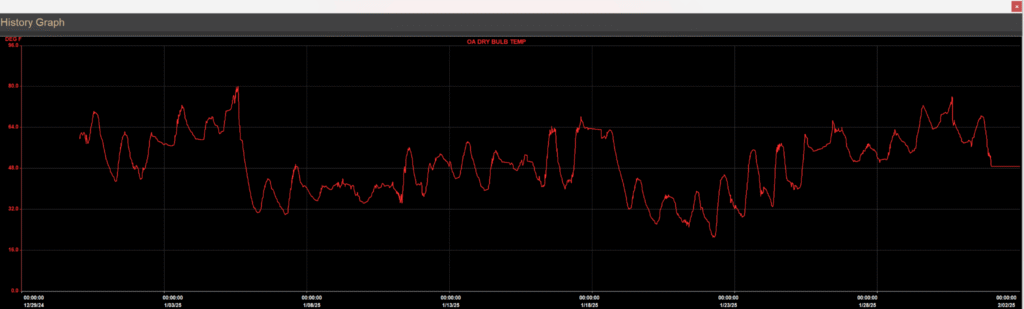
The takeaway: Twenty-plus blocks and two cautionary notes versus zero programming. Your trend data shouldn’t depend on remembering the fine print.
The Real Cost of Complexity
One unfortunate side effect of complex programming environments is that the knowledge of how the building works lives with whoever drew the diagram, and when that relationship ends, the building’s owner is left holding a wiring puzzle.
Every philosophy we hold at Computrols pushes against that outcome. Our plain-English if/then logic means your own operators, the people who walk the building every day, can read the sequence, understand it, troubleshoot it, and change it. Combined with free technical support, our lifetime warranty on boards we manufacture, and our commitment to open protocols, CBAS is built to put the building back in the hands of the people who run it.
Want to see it for yourself? Contact us for a demonstration.