
We are often asked for programming tips and tricks in CBAS. In this series, CBAS Logic Examples, we will share some helpful ways to accomplish various functions in CBAS.
Counting Binary Values
There are occasions when you will want to add up binary values, meaning count the number of units ON vs. OFF, OPEN vs. CLOSED, etc. For example, you might calculate the number of AHUs running simultaneously. Do this by defining an Analog Input software point and using logic in the Program Calculation to add the binary points. The example below illustrates this:
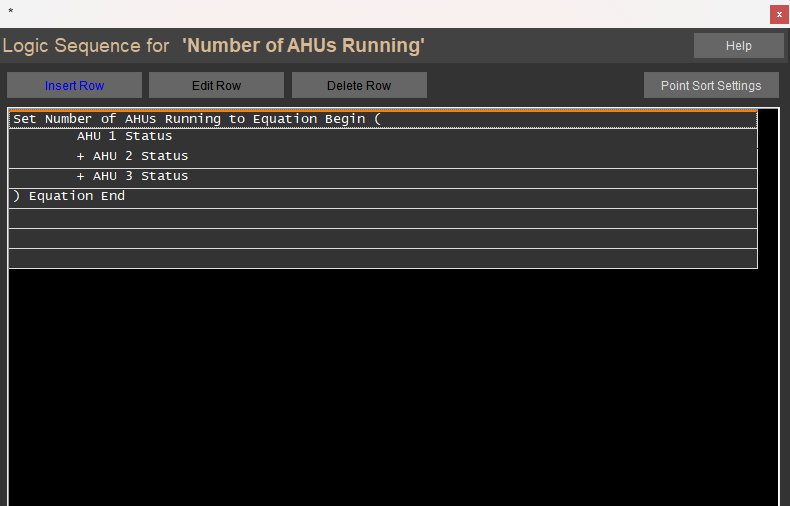
To program this logic, first create a Software Analog Input, then program the logic:
- Set value of software point.
- Click the Calculation Button.
- Click Binary Points State.
- Find the point you wish to use in your calculation (AHU 1 status in our example).
- Click the point.
- Click on the mathematical operation of +, -, x or /.
- Repeat steps 3-7 for the remaining points you want to include in the calculation.
Commanding vs. Adjusting
There are two ways to control an Analog Output point with Logic in CBAS: “Command” and “Adjust” logic statements. To understand the difference, you must first know what you want CBAS to do with the point you are commanding. Ask yourself these questions:
- Do I want to Command the point to a specific value, regardless of its current value?
- Do I want to Adjust the point to a new value based on its current value?
Using the Command statement will force a point to a specific value. For example, we may want to lock in a duct size setting for VAV control and not allow it to be changed:

Note that by using Command, we ignore whatever value the point may be commanded to; we simply command it to a specific value.
With Adjust, we will increase or decrease the point’s current value by specified increments.
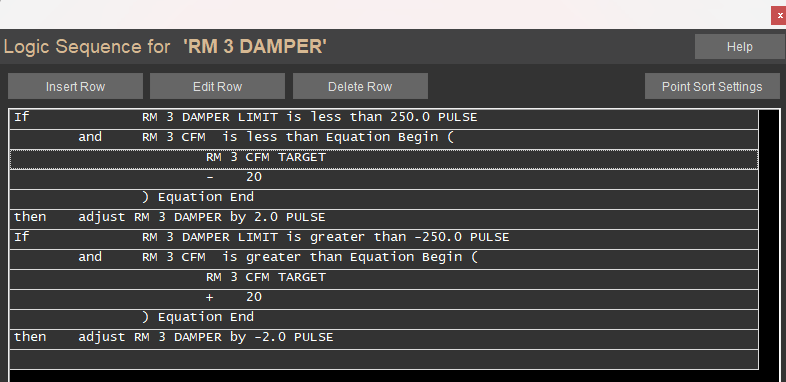
One example of using the ADJUST function is modulating a floating actuator, as seen in the example below. Here, the floating control damper motor is adjusted by two pulses in either direction needed to maintain the CFM target:
For additional support, contact Tech Support anytime!