CBAS 27 requires a CBAS 27-compatible Server, so the first step to upgrading is getting the right machine in place. Whether you order a new Server from Computrols or supply your own, this Tech Tip covers what’s in the box, the minimum specs, and the biggest change longtime operators will notice: CBAS now runs as a Service instead of in Real mode.
Because PC lead times are running longer than usual, the sooner you plan, the sooner your site can be on 27.
The New CBAS 27 Server
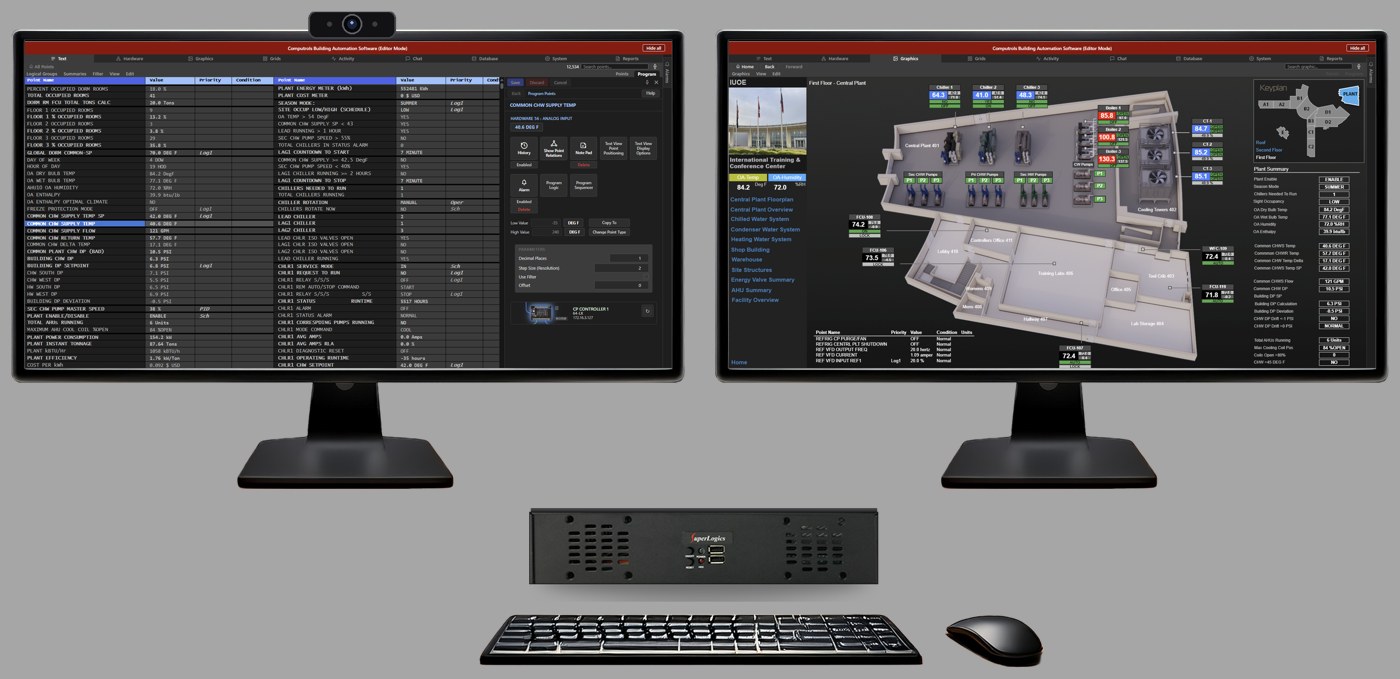
The Computrols Server is the quickest path to being upgrade-ready: a prepackaged workstation that arrives preloaded, optimized for CBAS 27, and ready to go. It includes a dual-monitor setup built for CBAS 27’s multi-monitor support, so you can drag tabs across screens and every view remembers where you left off, even after a restart.
| Item | Specification |
|---|---|
| Processor / memory / storage | Intel Core i5-14500T (14-core), 16 GB RAM, 512 GB SSD |
| Operating system | Windows 11 IoT Enterprise LTSC, 64-bit, preloaded |
| Monitor 1 | 27″ Full HD with built-in webcam, microphone and speakers |
| Monitor 2 | 27″ Full HD |
| Keyboard / mouse | Keyboard and mouse combo with media controls |
| Power | UPS battery backup |
| Software | CBAS 27, installed |
The integrated webcam, microphone and speakers on Monitor 1 support CBAS 27’s voice search and voice chat features.
A rack-mounted Server is also available for sites that keep their head end in a server room.
Supplying Your Own Machine
Prefer to use your own PC or a virtual machine? That’s fully supported, as long as it meets the minimums below, and Computrols installs CBAS 27 either way. A single monitor is all that’s required; a second monitor is optional if you want to take advantage of multi-monitor support.
| Component | Physical machine | Virtual machine |
|---|---|---|
| Operating system | Windows 11 Pro, 64-bit | Windows 11 Pro, 64-bit |
| Processor | Intel Core i5-14500T class (14-core) | 6 cores |
| Memory | 16 GB | 16 GB |
| Storage | 512 GB SSD | 512 GB |
| Display | One 1920 × 1080 monitor | — |
| Network | Gigabit wired LAN | — |
| Power | UPS | — |
| Internet | Outbound access for email alarms, Computrols support and monitoring | Same |
From Real Mode to Service: What Changes
In CBAS 20, operators moved between Editor, Real and GW modes, and CBAS ran only while Real was open on the DPU. In CBAS 27, CBAS always runs as a Windows Service in the background from the moment the PC starts up. What have historically been called GWs are now Workstations, with many of the abilities you previously associated with Editor mode. You interact with CBAS by logging in, rather than by opening and closing Real.
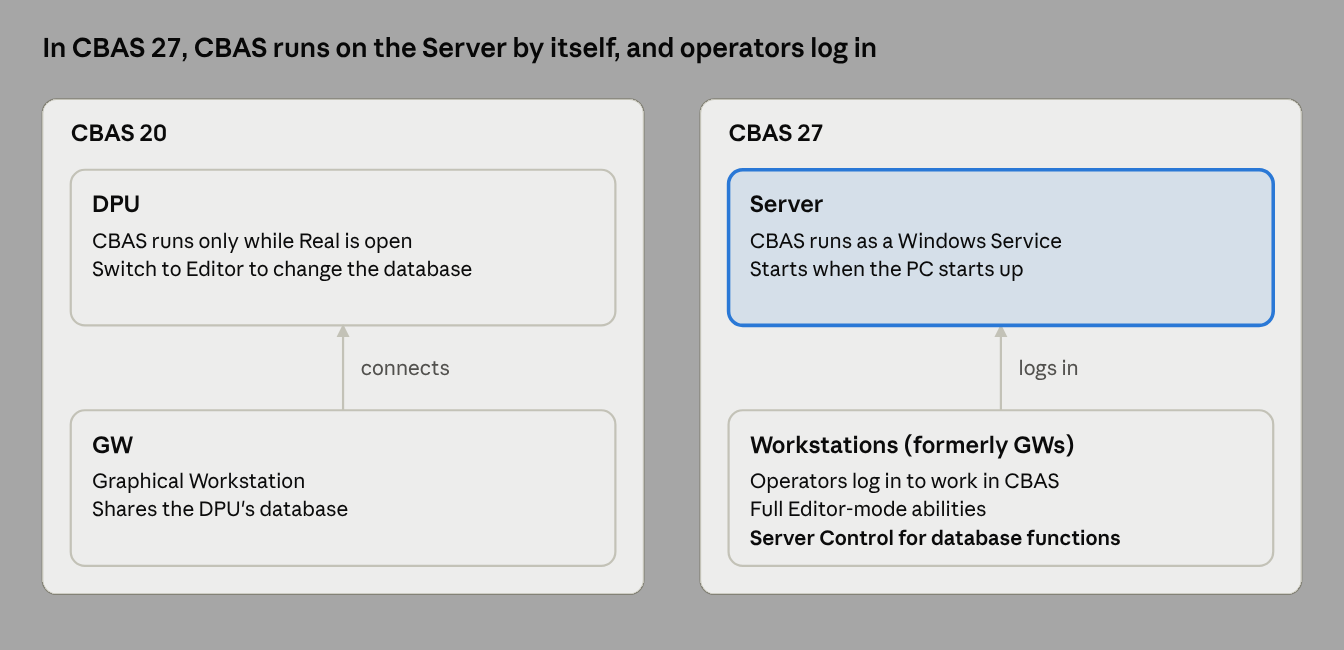
The takeaway: closing a window or not logging in to Windows no longer stops your building’s automation server.
Your 27-Ready Checklist
- Decide on hardware: a prepackaged Computrols Server (desktop or rack-mounted), your own PC, or a virtual machine
- If supplying your own machine, confirm it meets the minimum specs above and make sure the Server is on a UPS
- Contact Computrols to schedule your upgrade
Want to see CBAS 27 before you upgrade? Join us for CBAS 27 First Look, live Wednesday, November 18 at 1:00 PM CT. Save your seat.
Questions about your site’s hardware? Contact Computrols Technical Support at 504.529.1413 or techsupport@computrols.com.