At Computrols, we often point to the simplicity of our system as one of its top-selling features — and that simplicity becomes clearest when two platforms are placed side by side. We believe building automation does not have to be complicated. Our competitors tend to complicate programming by giving the user dozens of options that may require configuring. Delivering quality products and an intuitive user experience is at the forefront of everything we do, resulting in a platform that empowers the end user to take as much or as little control as is appropriate for their facility.
This is the third in our programming comparison series, following Siemens PPCL and Automated Logic’s EIKON. The examples below compare CBAS (Computrols Building Automation Software) to Delta Controls’ GCL+ (General Control Language), drawn from a large central plant supplying a multistory high-rise building. The Delta Controls GCL+ programming language is capable in an experienced programmer’s hands. Our CBAS programming examples will highlight our expression, “Building Automation Simplified” which puts the programming power back into your personnel’s hands.
Equipment Failure Alarm
Alarming a pump that’s commanded on but not running is among the most common requirements in any plant. In GCL+ it is written by hand, then copied and edited for every device — eleven times in this building’s hot and chilled water plants alone. In CBAS it is a built-in property of the point, identical for every pump, fan, chiller, and boiler.
Equipment Failure Alarm – Delta GCL+

Equipment Failure Alarm – CBAS
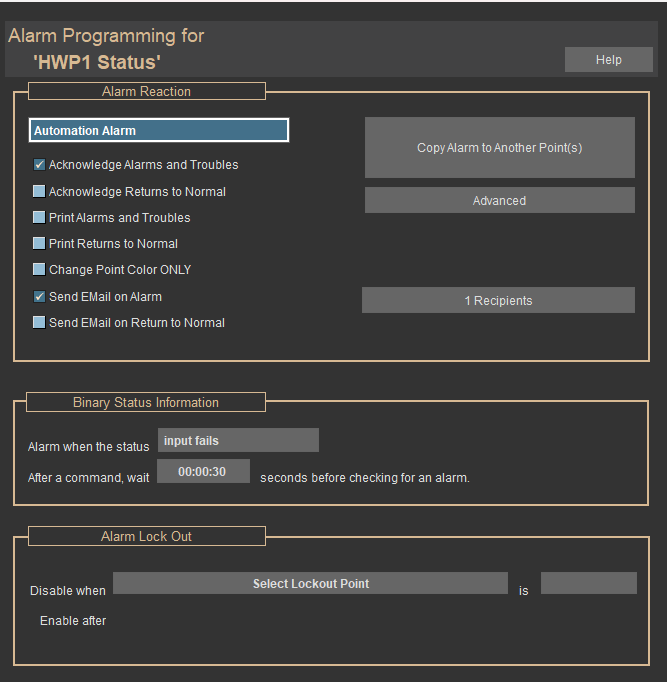
The takeaway: Because each copy is hand-typed in GCL+, small errors can persist unnoticed. Much simpler to use a checkbox on a point.
Sharing a Point Between Controllers
A central plant as large as this one spans many controllers, and GCL+ needs to be manually configured with hand-written “Import” programs that map points one line at a time — over a hundred lines on the hot water controller alone, and ten such programs across the site. In CBAS, a point is simply available system-wide and referenced by name.
Sharing a Point – Delta GCL+

Sharing a Point – CBAS
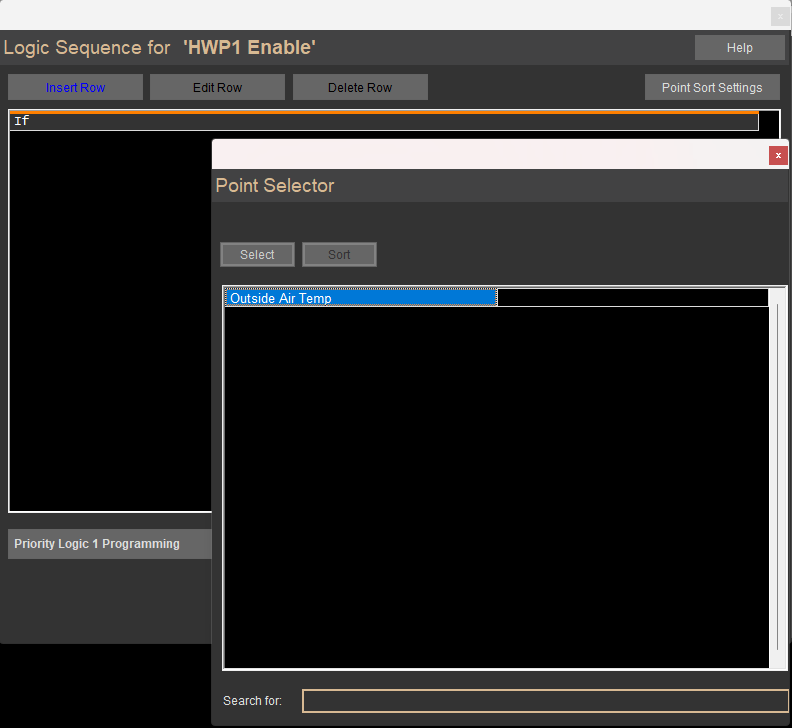
The takeaway: Hand mapping invites errors. In another example from a different application, this building’s meter program contains two water meters that are crossed — each reading the other’s totalizer — with no easy way to identify the problem.
Where Does the Logic Live?
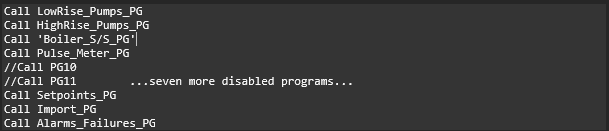
The first three examples each concern a single feature. This one concerns organization — the question a building owner actually asks when something breaks: can my staff find the logic? On the Delta system, every controller runs a master “Setup” program whose only job is to call the other programs in sequence. The programming for any one pump is spread across a dozen separate files, and this list is the only thing tying them together.
Where the Logic Lives – Delta GCL+
Where the Logic Lives – CBAS
In CBAS, Logic used to control points usually lives with the point itself, allowing the user to quickly find the Logic. In addition, Logic can be quickly disabled with a single button click.
In addition, every point in CBAS has a “Show Point Relations” function that lists and links to all logic references involving that point in the database, ensuring your staff has full access to all related logic programming.
The takeaway: The commented-out lines in GCL+ (the “//” lines) are entire programs still in the controller but switched off — invisible from the graphics. The only way to know they are disabled is to open this file and read it. CBAS gives you complete visibility into all logic programming for every point in the database.
Reset Schedule
We close where our PPCL comparison closed: resetting hot water temperature from outside air. Delta GCL+ expresses the reset schedule as a single dense statement whose meaning depends on memorizing the position and purpose of each field. CBAS expresses the same logic as a readable sentence, allowing the programmer to understand the statement without relying on field order alone.
Reset Schedule – Delta GCL+

Reset Schedule – CBAS
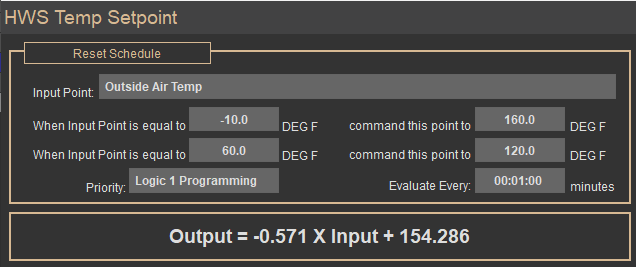
The takeaway: Hand programming position-dependent parameters can result in errors. Note the mismatch: the comment cites 155 and 85, while the code uses 160 and 120. The programming changed; the comment — the only readable part — did not. Configuring Reset Schedules with CBAS is as easy as reading a few prompts and is correctly set up with just a few clicks. No manual lookup or memorization required.
Building Automation Simplified
GCL+ can do anything in the right hands — which is precisely the point. In CBAS, failure alarms, runtime, and trending are built into every point; logic is written in plain English that documents itself, and that logic lives with each point controlling your equipment. The result is a system your own operators can read, question, and change. That is what we mean by Building Automation Simplified.
Want to see it for yourself? Contact us for a demonstration.