
Whenever CBAS probes a BACnet device, MultiState Value (MSV) points are imported from the Probe file, and their configuration is set to the MultiState Value Output point type. Upon reviewing the imported points against the device’s integration documentation, you may notice that some points should not be commandable. How can you address this?
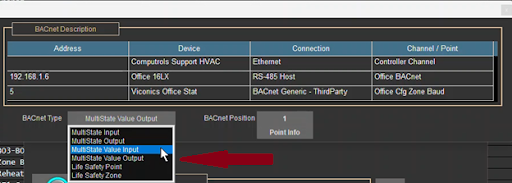
In the example below, the Office Cfg Zone Baud point was imported as a commandable point that we wish to make not commandable. To resolve this issue, you must change the BACnet type of the point from MSV Output to MSV Input. This prevents the point dialogue pop-up box from displaying the ‘Command State’ button, as shown below:

Steps to Change the Point Type
- Access the Point Program Screen
- Click the ‘Program’ button on the point.

- Open BACnet Settings
- Click the ‘BACnet’ button at the bottom left of the screen.

- Modify the BACnet Point Type
- Locate the BACnet Type selector
- Click on the current setting ‘MultiState Value Output’
- Select a new type from the drop-down menu.
- Press ESC to save the changes.

Result
Once the point type is updated to an input type, the point will no longer be commandable. Clicking on the point will only display the ‘Point Program Screen’ as shown below.

By following these steps, you can ensure that any non-commandable points are configured correctly in CBAS, aligning with the integration requirements of your BACnet device.