CBAS Web

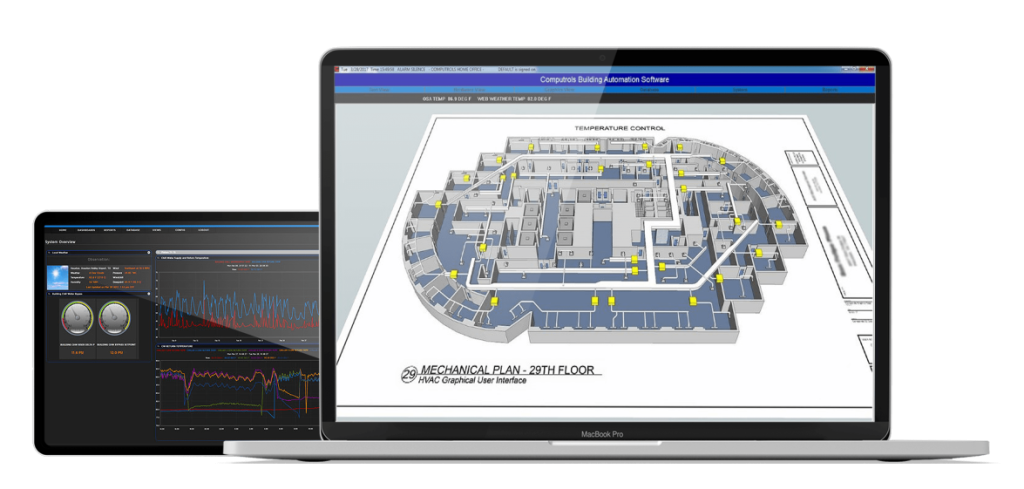
CBAS Web FrontCBAS Web Back

Click image to zoom-in.

Highlights

CBAS-Web is building automation via the Internet. This is Computrols' premier web-enabled building automation product. CBAS-Web provides a point monitoring and command interface to any Professional or Enterprise CBAS DPU, as well as providing programming features including schedules and overtime. With CBAS-Web, you possess a professional, clean, and easy to use interface to CBAS.

Test Drive CBAS WebDownload accounting module sample invoices

CBAS-Web goes beyond the monitor and automation tasks of CBAS. You'll find a rich assortment of additional useful features:

CBAS Web screen
  • A context-sensitive help resource
  • Text and bar graph reports--in-place sortable by any field
  • Per-user customizable preferences (color-scheme, default views, point status update rate, and number of points per screen)
  • An easily customizable look and feel--the administrator can change logos and even the tagline at the top of the screen
  • User-to-user, or user-to-group messaging
  • One-click backups
  • The ability to program any number of CBAS DPUs into CBAS-Web, allowing a centralized view for points across many job sites or installations
  • An automated security sentry that will message the administrator in the event of suspicious behavior. Example: Repeatedly trying to access non-accessible files, or incorrect passwords being entered.

Datasheets

  • CBAS-Web.pdf
  • CBAS-Web is building automation via the Internet. This is Computrols' premier web-enabled building automation product.

  • CBAS-Web-Accounting-Module.pdf
  • The CBAS-Web Accounting Module provides a complete invoicing solution for CBAS-Web.

  • CBAS-Datasheet.pdf
  • CBAS, the simplest building automation system software to install, program, maintain, and operate. CBAS software is capable of seamlessly integrating with various manufacturers' field controllers.

  • CBAS-Mobile.pdf
  • CBAS-Mobile has the power to monitor and control your building from a truly mobile web-enabled device. Whether a cell phone or PDA, you have the instant access you need no matter your schedule.

  • CBAS-Innovations.pdf
  • This three-page overview of CBAS features shows you first hand several popular features in CBAS via screen captures of the actual software being used.

  • Computrols-CBAS-Web-Manual.pdf
  • Official user manual for CBAS-Web. Also features the CBAS-Mobile user manual.

  • Computrols-CBAS-Manual.pdf
  • User manual for CBAS (Computrols Building Automation System) Software. *Note: File size is 11MB. Please be patient during download.

  • Computrols-CBAS-Graphics-Manual.pdf
  • Computrols has created a set of modular graphics for use with CBAS. This manual describes the procedure for importing and implementing these new graphics.

  • CBAS_Network_Architecture.vsd

  • CBAS_Network_Architecture.jpg

  • CBAS_Basic_Animations.zip

  • CBAS_7_8_VAV_Templates.zip

  • cbas-visio-graphics-library.vss
  • Microsoft Visio BAS Graphics

  • CBAS-Starter-Kit.pdf
  • The CBAS Starter Kit is a self-contained portable platform available to Computrols Distributors for the purpose of showcasing the technology available in the Computrols Internet Appliance line of Direct Digital Controllers.

  • CBAS-Sequencer.pdf
  • A sequencer takes several binary points and combines them into a single continuous analog output. This feature can be found on the Point Program Screen of a Software Analog Output Setpoint in CBAS.

  • CBAS-Email-Alarm-Editor.pdf
  • Included to accommodate CBAS systems that have high-speed Internet service instead of dialup service, you can now send an email rather than just a page. The email message that is sent includes the name of the point and the status of that point. Read this document to see how.

  • CBAS-and-Veris-Hawkeye.pdf
  • Many building management companies are interested in monitoring energy usage, either for tenant spaces or for the entire building. Monitoring can be included in their CBAS system through the use of Veris Hawkeye meters.